使用 Docker 配置交叉编译环境
- 首先 安装 Docker
- 然后下载 ubuntu 作为基础镜像
sudo docker pull ubuntu:20.04 - 启动容器
sudo docker run -h aarch64 --name aarch64 -it ubuntu:20.04
最新版 ubuntu 22.04 的
libc6-dev-arm64-cross为 2.35,与目标平台上的版本 2.28 不兼容,因此使用 20.04 版本的镜像。
sudo docker pull ubuntu:20.04sudo docker run -h aarch64 --name aarch64 -it ubuntu:20.04最新版 ubuntu 22.04 的
libc6-dev-arm64-cross为 2.35,与目标平台上的版本 2.28 不兼容,因此使用 20.04 版本的镜像。
Tan90-Proxy 是一个 NAT 穿透代理服务器。
可以将 Minecraft 服务程序部署在本地,然后通过一个廉价低配的公网服务器转发,从而降低开服成本。
一些服务器优惠页面:

以 Lolipop Media Player 为例。
本文全部使用
HKEY_CURRENT_USER,表示当前用户的配置。 可以替换为HKEY_LOCAL_MACHINE,表示所有用户的配置。
FreeType2有水平、竖直两种文字布局,注意原点的位置。
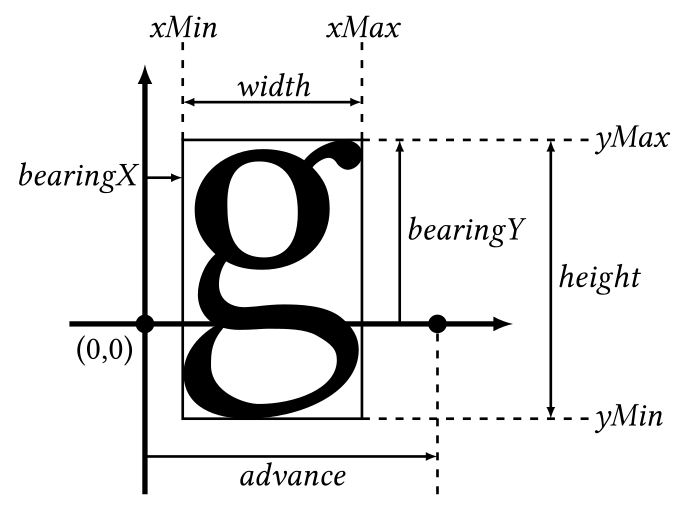
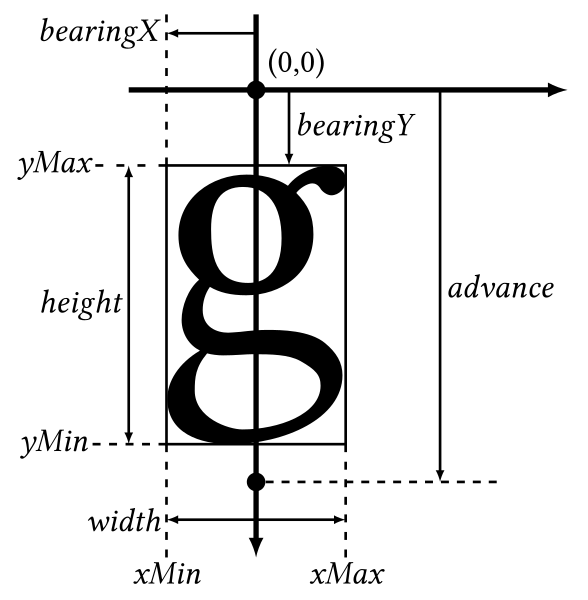
参考: https://freetype.org/freetype2/docs/glyphs/glyphs-3.html
在 Pull Request 的 URL 结尾加上 .patch 即可重定向到 PATCH
例如 https://github.com/hubenchang0515/SmartQQ/pull/3 添加 .patch
变为 https://github.com/hubenchang0515/SmartQQ/pull/3.patch
即可重定向到 https://patch-diff.githubusercontent.com/raw/hubenchang0515/SmartQQ/pull/3.patch
参考: https://about.gitlab.com/install/
安装依赖:
1sudo apt update在使用 JSON 时经常遇到需要忽略字段的情况,例如返回用户信息时不能返回密码,通常将注解 TAG 设为 json:"-" 即可:
1type User struct {
2	Account  string `json:"account"`
3	Password string `json:"-"`
4	Nickname string `json:"nickname"`
5}Kafka 有两种使用方式:基于 zookeeper 和基于 kraft.
启动:
1./bin/zookeeper-server-start.sh ./config/zookeeper.properties
2./bin/kafka-server-start.sh ./config/server.properties